Progress by core value
See where your team's goals and effort sit across your core values, for the whole team on the Outcomes report and for each person.
Each goal can be linked to one core value. That lets you see which values your team is putting its effort into, and which are being left behind. There are three places to look. All of them use only goals people share with you.
Across the whole team
- Open the report. Choose Reports in the menu (Outcomes in a coaching account, Progress report in a school).
- Choose who and when. Pick All my team members or a group, then Month, Quarter or Programme.
- Read Where goals sit. Each value shows the share of goals in play that are linked to it. Goals with no value show as No core value.
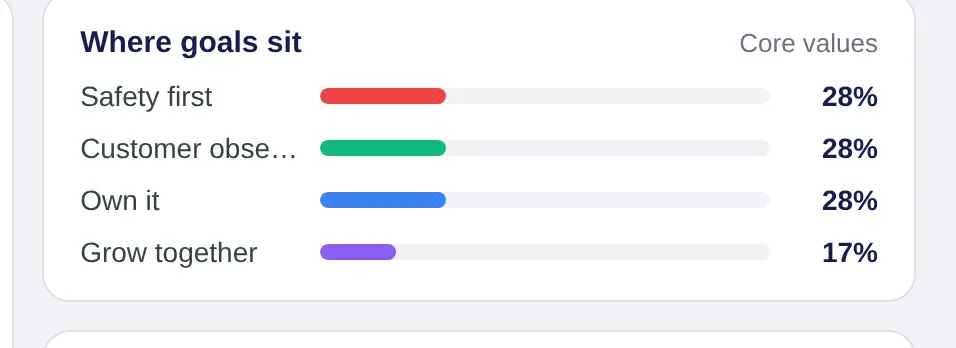
Many goals under No core value usually means people are skipping that question. Tie goals to your core values shows them how.
For one person
Open a team member from Team Members, or by choosing their name on Today. Then:
- Goals tab. The card headed Across and their name, such as Across Amelia's core values, shows the share of tasks they've done in the last 30 days under each value.
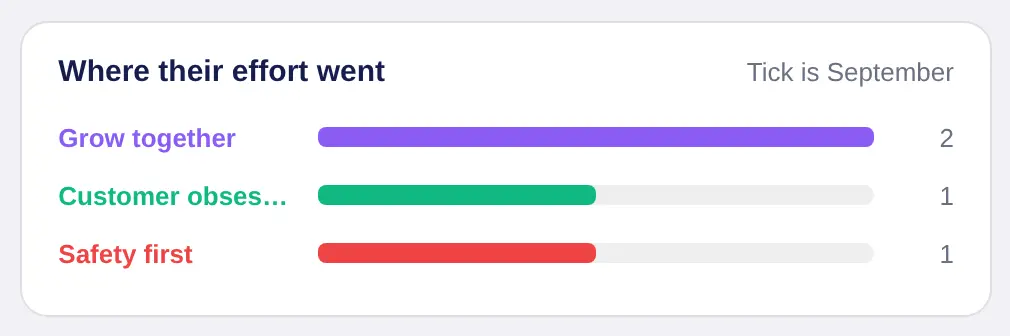
- Reports tab. Where their effort went shows tasks done under each value for the period you choose, with a tick for the period before, so you can see the change.
Get cleaner numbers
The numbers are easiest to compare when everyone uses the same values. An admin can set one shared set for the whole organisation in Set your core values.
In a school they're called values. An admin can pick another word, such as Principle or Pillar in a business, in Branding and words.
