Download a term report
Download the Progress report for a mentor group as a PDF, for a month, a quarter or the whole programme so far.
The Progress report sums up how a group of students is going: their goals, tasks done on time, reflection answers and mood. You can read it on screen or download it as a PDF to share at the end of a term.
Lifetick doesn't know your school's term dates. Pick the period that fits best: Month, Quarter (calendar quarters, such as Q4 2026 for October to December), or Programme, which runs from the first goal your students shared to today.
Download it
- Open the report. Choose Progress report in the menu.
- Choose the group. In the menu at the top, choose your mentor group, or All my students. Admins and super teachers also have Everyone.
- Choose the period. Choose Month, Quarter or Programme. Use the arrows beside the dates to go back to an earlier month or quarter.
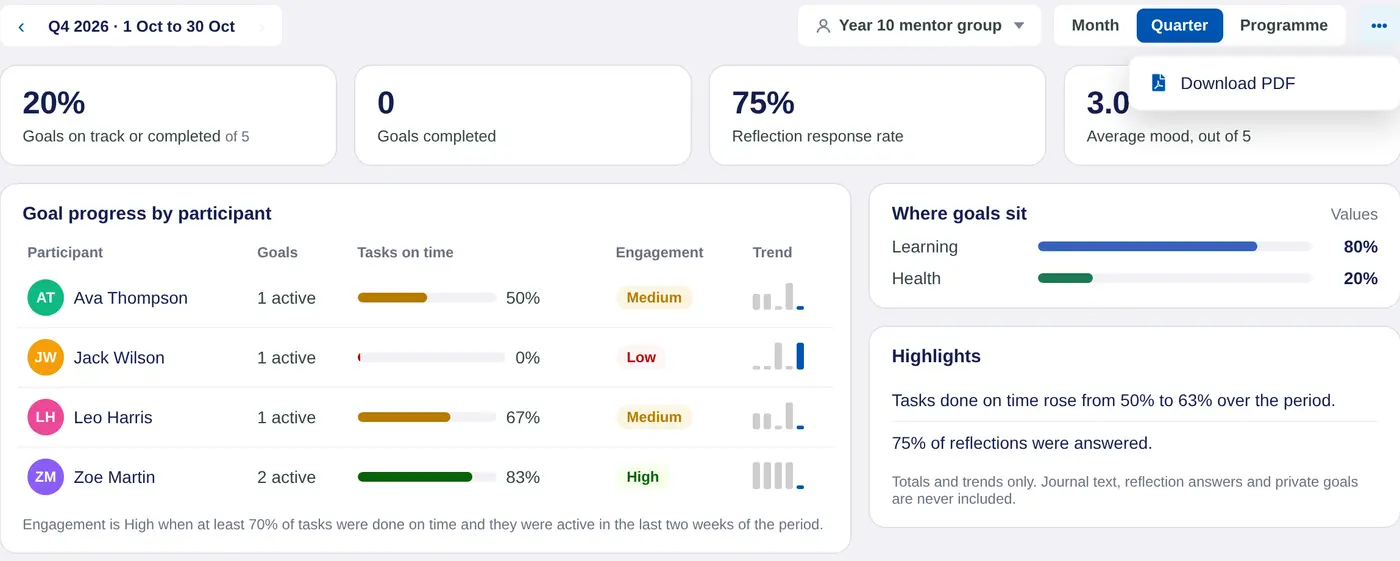
- Download the PDF. Choose •••, then Download PDF. The file is named after the group and period, such as Year-10-mentor-group-Q4-2026.pdf.
What's in it
The PDF is A4, with your school's name, the group, the dates and how many students it covers. It has:
- Four numbers. Goals on track or completed, goals completed, the reflection response rate and the average mood out of 5.
- Goal progress by participant. Each student's active goals, tasks done on time and engagement (High, Medium or Low).
- Where goals sit. How goals spread across your school's values.
- Highlights. A few plain sentences, such as how tasks done on time changed over the period.
It shows totals and trends only. Journal text, reflection answers and private goals are never included.
Engagement is High when at least 70% of tasks were done on time and the student was active in the last two weeks of the period.
Before you share it
A quarter still in progress ends today, so the report covers the quarter so far. For a full term, wait until the quarter has finished, or download it again later. If a student isn't in the report, check they're in the group. See Set up a mentor group.
