Write a SMART goal
Five short questions turn a wish into a goal you can plan for. It takes about a minute.
Every goal in Lifetick starts with the same five questions: specific, measurable, achievable, relevant and time specific. Only the first and the last are required.
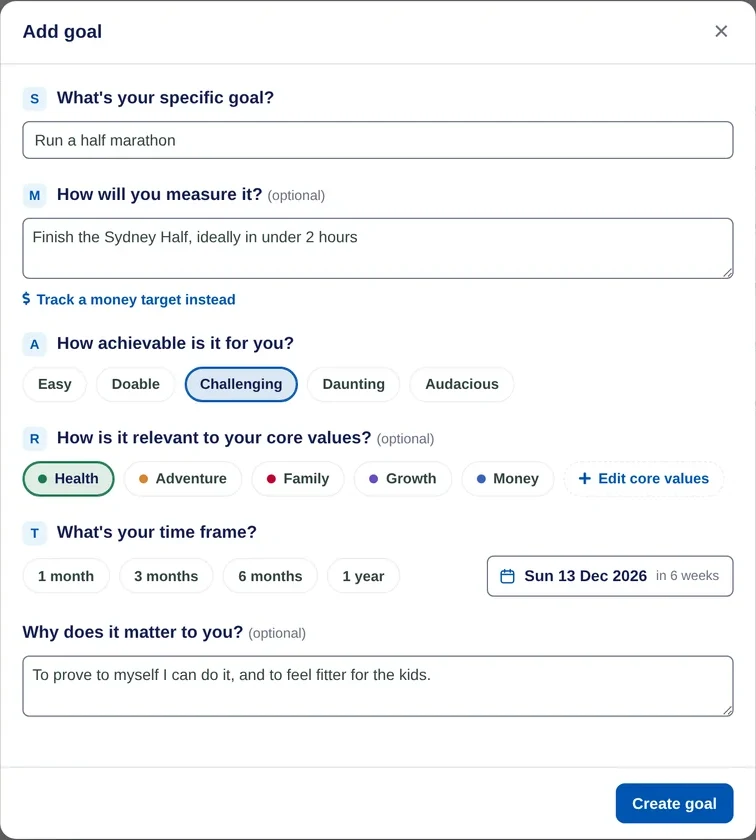
Write the goal
- Open Add goal. On the web, go to Goals and choose Add goal. On iPhone, open the Goals tab and tap + Goal.
- Say exactly what you want. Under What's your specific goal?, write it in your own words. "Run a half marathon" works better than "get fit".
- Decide how you'll measure it. Optional. Under How will you measure it?, describe what done looks like. For a savings, debt or sales goal, choose Track a money target instead to enter an amount.
- Pick how achievable it is. Choose Easy, Doable, Challenging, Daunting or Audacious. Hard but possible tends to work best.
- Link it to a core value. Optional. Pick the value it serves, such as Health or Family. Edit core values changes the list.
- Set a time frame. Choose 1 month, 3 months, 6 months or 1 year, or pick an exact date.
- Say why it matters, then save. Optional, but it helps on the hard days. Choose Create goal.
After you save
The goal opens so you can add its first tasks. Small steps with dates are what move a goal along, and each one you tick off moves the progress bar.
On the Free plan you can have two goals at a time, and a money target needs Premium. Premium has no goal limit.
